

“A mind map is a diagram used to represent words, ideas, tasks, or other items linked to and arranged radially around a central key word or idea. It is used to generate, visualize, structure, and classify ideas, and as an aid in study, organization, problem solving, decision making, and writing.” – Wikipedia
Mind maps are great when I need to get my ideas out on a page. In fact, I use mind maps exclusively to map out campaign concepts, types of medium, and prize categories before walking into and during a brainstorm meeting. I also use them for blogging concepts, story ideas, and other creative endeavors. So naturally, my notebook is filled with diagrams. Unfortunately, there are times when I map out ideas too quickly that when I go back and look at them, I don’t understand what I wrote… I had to find a way to do it better.
Just recently, I discovered mind42.com and nearly flipped out. Now I can create mind maps in my browser for free and collaborate with co-workers. I can assign icons and colors to specific nodes and best of all, I can add images too.
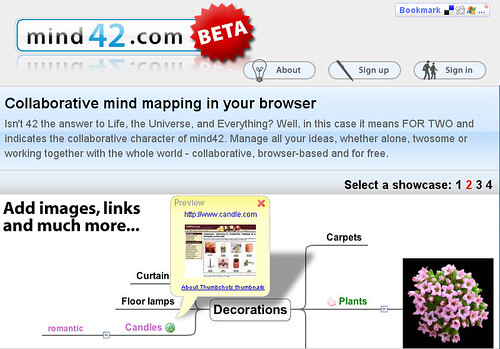
Here’s a quick overview of the features at mind42.com:
Now get mapping!
(Video Credit: Mind42)


10 Comments
Hey Stephanie! (Hah. I crack myself up!)
This looks like a super-cool tool! Now… if only I could be creative enough to be able to use mind maps properly — I just end up doing lists in a random, unorganised cloud format, thus defeating the whole purpose!!!
Hey Sunili!
You should give mind maps a try – you might get a kick out of the URL and image features. But if cloud formats get your creative juices flowing, then I say, stick with what you know best.
What is the answer to LIFE?
42
What is the answer to insane days at work?
Mind42
Tinylittlebit, you are too funny! I love it.
Another cool product. You’re a wealth of knowledge, Ms. Stephanie. Thanks.
Thanks Mike. I’m a firm believer that we should all work smarter not harder and mind42 meets that objective.
Hey Stephanie,
I have a blog dedicated to Mindmapping (http://mindmapblog.wordpress.com). You might want to check it out. May be some good info for your readers.
You have a very nice site by the way. Have a good day. —Chance
@Chance Wow Chance, your blog has a lot of great information. I’m going to have to add it to my list of blogs that I read. I’d like to hear more about how mindmapping is a successful tool for you in your career. Perhaps you can grace us with a guest post so we can learn more about you – how does that sound?
Cheers,
Stephanie
Sounds great Stephanie. So, you’d like me to talk about how Mindmapping has been a successful tool in my career?
Absolutely, I think the readers here can benefit from your expertise on how they can incorporate mindmapping to their projects at work. Send me an email and let me know what day works best for you to be a guest blogger here.